
Ordering electronics online in Europe should be straightforward, but for many shoppers it turns into a frustrating cycle of second-guessing, unreliable sellers, and post-delivery regret. With hundreds of product listings, varying warranty rules across EU countries, and payment risks from unknown vendors, it's easy to feel lost before you even add something to your cart. The good news is that a clear, repeatable workflow removes that uncertainty entirely. Follow the steps in this guide and you'll know exactly what to check, when to check it, and how to protect yourself at every stage of the process.
Table of Contents
- Before you buy: Setting your requirements and budget
- Researching products and comparing options
- Making the purchase: Payment, security, and order confirmation
- Receiving, inspecting, and resolving post-purchase issues
- What most guides miss about buying electronics online in Europe
- Ready to buy smart? Shop with confidence at OnlineStore24
- Frequently asked questions
Key Takeaways
| Point | Details |
|---|---|
| Clarify your needs | Defining your requirements and budget up front prevents costly mistakes when shopping for electronics online. |
| Verify sellers and products | Carefully research and compare options to avoid scams and ensure you get the best value in the European market. |
| Prioritize safe payment | Choose secure payment methods and keep order documentation to protect yourself during and after the purchase. |
| Act quickly after delivery | Inspect your electronics on arrival and immediately resolve any issues with the retailer for a smooth experience. |
Before you buy: Setting your requirements and budget
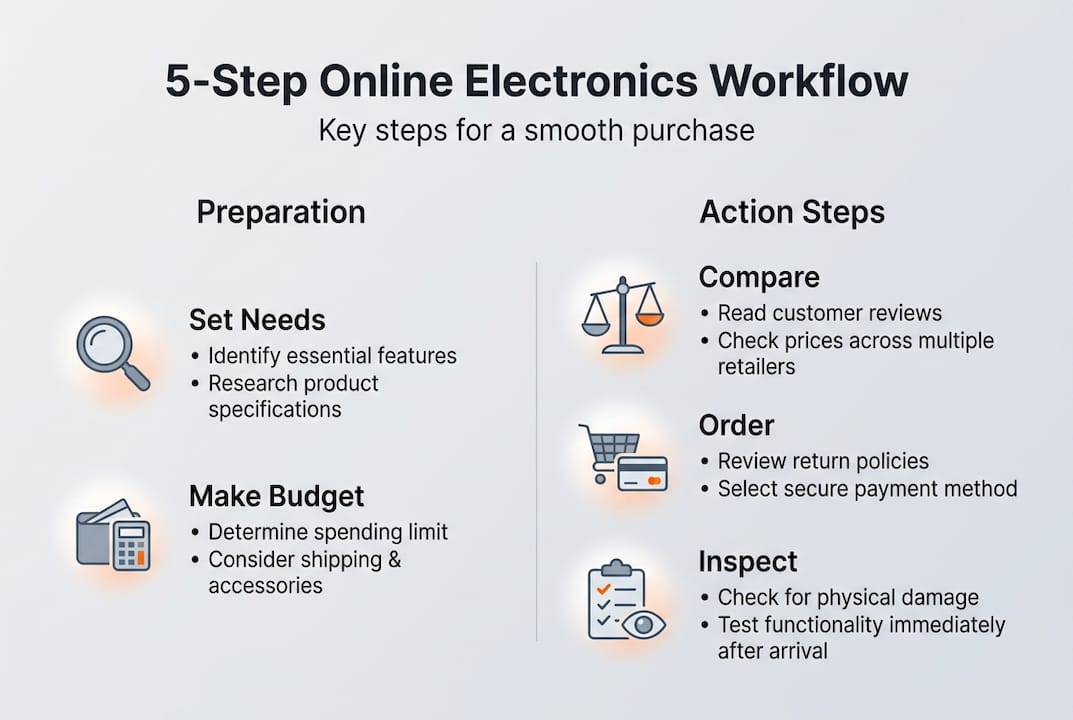
The single biggest mistake online electronics shoppers make is browsing before they know what they actually need. You open a product page, get distracted by a flashy spec sheet, and end up buying something that doesn't quite fit your life. Starting with a clear picture of your requirements fixes that immediately.
Begin by defining the primary use case for the device. Ask yourself: Is this for work, entertainment, or everyday portability? A laptop for video editing has very different requirements than one for checking email on the go. Write it down. That one sentence will filter out 80% of irrelevant options before you spend a single minute browsing.
Next, list the features you absolutely cannot compromise on. Keep this list short and honest. If you need a minimum of 16 GB RAM for your workflow, that's non-negotiable. If you'd prefer a larger screen but could live without it, that's a preference, not a requirement. Knowing the difference saves both time and money.
Setting a realistic budget is where many shoppers underestimate the full cost. Clarifying your needs upfront helps you filter out unnecessary features and save money. Factor in shipping, VAT, and any accessories you'll need from day one. A great resource for saving money on electronics covers strategies that go beyond simply hunting for the lowest price.
Here's a quick reference for budget planning:
| Cost factor | Why it matters |
|---|---|
| Base product price | Your starting point |
| VAT (varies by country) | Can add 19-27% to the price |
| Shipping and handling | Often free above a threshold |
| Accessories and cables | Frequently overlooked |
| Extended warranty | Optional but worth considering |
When thinking about brand value in Europe, consider these factors:
- After-sales support: Does the brand have EU-based service centers?
- Spare parts availability: Can you find replacements locally?
- Software updates: Does the manufacturer support the product long-term?
- Community reputation: Are European buyers consistently satisfied?
For ideas on which devices offer the best value right now, browsing electronics for modern homes gives you a solid starting point across multiple categories.
Pro Tip: Check for seasonal promotions, bundle deals, or cashback offers before you finalize your budget. Major sales events across Europe often bring 15-30% discounts on popular electronics, and buying a bundle can significantly reduce the total cost of ownership.
With your shopping goals clear, move on to building your shortlist of products.
Researching products and comparing options
Once you have a defined need and a budget, research becomes much more focused and efficient. You're no longer browsing randomly. You're evaluating specific candidates against a known set of criteria.
Start with technical specifications. Compare products side by side using a simple table. Look at the specs that directly affect your use case and ignore the rest. Here's an example for comparing two mid-range laptops:

| Feature | Option A | Option B |
|---|---|---|
| Processor | Intel Core i5 | AMD Ryzen 5 |
| RAM | 16 GB | 8 GB |
| Storage | 512 GB SSD | 256 GB SSD |
| Battery life | Up to 10 hours | Up to 8 hours |
| Weight | 1.6 kg | 1.4 kg |
| Warranty (EU) | 2 years | 1 year |
Reading user reviews alongside expert opinions gives you a complete picture. Verified reviews and product ratings are crucial for avoiding poor-quality products or unreliable vendors. Look for patterns in negative reviews rather than reacting to individual complaints. If 40 people mention the same battery issue, that's a real problem.
Over 80% of shoppers trust user reviews when buying electronics online, which means the review section is one of the most valuable tools you have. Use it.
Use this numbered checklist to evaluate whether a retailer is trustworthy before you buy:
- Verify the retailer is registered within the EU and displays a valid business address.
- Check that the website uses HTTPS and shows recognized secure payment logos.
- Read the return and refund policy carefully, especially for your country.
- Confirm the warranty offered meets the EU minimum of two years for new goods.
- Look for third-party trust seals or verified buyer review platforms.
- Search the retailer's name alongside terms like "scam" or "complaint" before purchasing.
For a deeper look at safe EU electronics shopping, there's a dedicated guide that walks through retailer verification in detail. You can also find practical consumer electronics tips Europe to sharpen your evaluation process further.
Once you've identified trustworthy products and sellers, it's time to make your choice and ensure a secure purchase.
Making the purchase: Payment, security, and order confirmation
You've done your research. Now it's time to buy, and how you pay matters as much as what you buy. Secure payment methods like credit cards and trusted gateways offer extra protection for online shoppers, including the ability to dispute charges if something goes wrong.
Follow these steps when completing your purchase:
- Choose a protected payment method. Credit cards and established payment platforms like PayPal offer buyer dispute options. Debit cards provide less protection.
- Verify delivery options for your location. Check estimated delivery times, shipping costs, and whether the retailer ships directly to your country from an EU warehouse.
- Review the final price at checkout. Confirm that VAT is included and no unexpected fees appear before you confirm.
- Complete the transaction on a secure connection. Avoid purchasing over public Wi-Fi. Use your home network or a trusted mobile connection.
- Save your order confirmation immediately. Screenshot or forward the email to a dedicated folder. You'll need it for tracking, returns, or disputes.
- Note the tracking number and expected delivery window. Set a reminder to follow up if the package doesn't arrive on time.
For EU electronics shopping safety, using safe payment platforms with clear buyer protection policies is one of the most effective ways to avoid financial loss.
"Never send payments by wire transfer to unknown sellers. This method offers no consumer protection and is a common tactic used by fraudulent vendors."
Pro Tip: Always enable two-factor authentication (2FA) on your payment accounts and email. 2FA adds a second verification step, such as a code sent to your phone, making it significantly harder for unauthorized users to access your accounts during a transaction.
Now that you've completed your purchase, monitor delivery and prepare to verify your new device on arrival.
Receiving, inspecting, and resolving post-purchase issues
The purchase is confirmed, but your workflow isn't finished yet. What you do in the first 24 to 48 hours after delivery can determine whether a problem gets resolved quickly or becomes a prolonged headache.
When your package arrives, inspect it before signing anything if possible. Here's what to check:
- Outer packaging: Look for obvious signs of crushing, punctures, or water damage.
- Seals and shrink wrap: Broken or missing seals on electronics can indicate tampering or a returned item being resold.
- Contents against the packing list: Confirm every item listed in the box is actually present.
- Physical condition of the device: Check for scratches, dents, or cracked screens before powering on.
- Serial number: Match it against the documentation included in the box.
Promptly checking devices for physical or functional issues is essential. Report problems to the seller immediately, as delays can complicate your claim.
Test the core features on the day of arrival. For a smartphone, check the screen, camera, speakers, and charging port. For a laptop, test the keyboard, trackpad, display, and battery. For audio equipment, test all inputs and outputs. Don't wait a week to discover a defect.
If something is wrong, follow these steps:
- Photograph or video the issue clearly, including the packaging and serial number.
- Locate your order confirmation and note the order number.
- Contact the seller's support team through their official channel within 48 hours.
- State the issue clearly, attach your evidence, and request a specific resolution (replacement or refund).
- Follow up in writing if you don't receive a response within two business days.
For the safe delivery and returns workflow, keeping all original packaging and documentation until the return window closes is essential. Common post-purchase mistakes to avoid include discarding warranty papers, deleting order confirmation emails, and failing to register the product with the manufacturer when required.
With your workflow complete, consider how these steps change your experience as a European electronics buyer.
What most guides miss about buying electronics online in Europe
Most buying guides focus on a single purchase. They help you pick the right product today, but they don't help you become a smarter buyer over time. That's the real gap.
The buyers who consistently get the best results aren't necessarily the ones who spend the most time researching. They're the ones who have built a personal system. They know which questions to ask, which red flags to look for, and which steps to never skip. That system is what this workflow is designed to give you.
True savings aren't just about finding the lowest price. They come from buying the right product, from a reliable seller, with a clear return path if needed. A device that fails after 90 days and takes three months to replace costs far more than a slightly pricier option from a trusted retailer.
For readers who want to go further, Europe electronics buying guides offer category-specific advice that builds on everything covered here. The more you use this workflow, the faster and more intuitive it becomes, and the less likely you are to experience buyer's regret.
Ready to buy smart? Shop with confidence at OnlineStore24
Now that you have a complete workflow in hand, putting it into practice is the next step. OnlineStore24 is an EU-based retailer built to support exactly this kind of informed, confident shopping. With fast delivery from European warehouses, transparent return policies, and secure payment options, the platform is designed to meet you at every stage of the process.
Whether you're looking for kitchen accessories like the Kenwood AT340 accessories, networking gear like the Trendnet TEW-821DAP access point, or browsing a broad catalog of verified electronics, our trusted electronics store gives you the product selection and customer support to shop without second-guessing yourself.
Frequently asked questions
How can I avoid buying counterfeit electronics online?
Always buy from verified EU retailers and check product listings for authentic certifications, serial numbers, and verified customer reviews. Counterfeit products rarely include proper EU compliance markings such as the CE label.
What payment method is safest for online electronics in Europe?
Credit cards and established secure payment gateways provide the strongest buyer protection, including chargeback rights if a product is not delivered or is misrepresented.
How do I handle a defective or damaged product after delivery?
Report the defect immediately with photos and your order number, then request a replacement or refund through the seller's official support channel. Prompt action and documentation are the two most important factors in resolving post-purchase issues quickly.
Are taxes and customs fees included when buying electronics online in the EU?
Most reputable European electronics retailers display prices with VAT already included, but always verify the final amount at checkout for your specific country. European sellers often include VAT, but additional local fees can occasionally apply depending on your region.